Key points

Retrieval is only the start
An invoice pulled from KSeF (Polish National e-Invoicing System) into EZD (electronic document and case management system) still needs to be described, approved, checked and posted.
One invoice, several systems
KSeF, EZD, the contract and procurement register, the financial plan, the finance and accounting system, and online banking.

Time is lost on supporting tasks
Hunting for the contract and order, retyping amounts, printing, asking who placed the order.
Process first, tool second
A mapped-out workflow from receipt to payment shows what should be integrated and what should stay with people.
Zdjęcia ilustracyjne
This post is for secretaries (sekretarz) and treasurers (skarbnik) who hear from a vendor "our EZD handles KSeF" and wonder whether that settles the question of invoice workflow.
What EZD–KSeF integration actually does
From 1 February 2026, public authorities receive structured invoices through the Polish National e-Invoicing System (KSeF). Some EZD-class systems, including EZD RP, can pull such an invoice and show it as an incoming item. That is a real benefit: the invoice does not get lost in an e-mail inbox, it carries a KSeF number and a receipt date, and it is visible in the system. Usually, though, it does not go straight into a case file. First it is seen by the registry office, which forwards it to the responsible unit, and only that unit attaches the invoice to the case. And does the registry office actually know, right away, which organisational unit such an invoice should be assigned to? It is also worth remembering that the invoice's metadata describes the invoice itself – line items, net and gross amounts, VAT rates. It does not always match what is in the incoming correspondence registration form, whose metadata scope is set by the authority's filing instructions.
That, however, is where the integration ends. The invoice is in the system, even in a case file, but no one has yet described it, approved it, checked it or posted it. What happens next depends on how the authority has organised the workflow for accounting documents. In many authorities it still looks exactly as it did before KSeF: a printout, signatures on the back or on a stamp, a folder sent to finance, manual entry into the finance and accounting system.
Pulling an invoice from KSeF into EZD is like a courier leaving a parcel at reception. The parcel is in the building and you know when it arrived. But someone still has to collect it, check the contents against the order, sign the delivery note, and report it to accounting. A faster courier does not shorten the parcel's journey through the building.
The invoice's journey from receipt to payment
Every authority has this journey described in its internal instructions on the circulation and control of accounting documents. The details differ, but the steps are usually similar.
- Receipt. The invoice arrives via KSeF, but not only via KSeF. Until the end of 2026, some smaller suppliers may still issue invoices outside KSeF, and foreign suppliers issue them outside the system even afterwards. Invoices still arrive by e-mail and on paper, and paper ones have to be scanned and read (OCR) so the data is not retyped by hand. KSeF generally leaves no room for attachments (the FA(3) structure allows only a limited data-based attachment, and its use must be declared), so suppliers often send the same invoice again by e-mail together with the documents that accompany it: an acceptance protocol, a breakdown of works, or a specification. Sometimes they send a printout or a PDF of an invoice that is already in KSeF, with no attachments at all. During a KSeF outage or in offline mode, an invoice with a QR code reaches the authority before it reaches the system. The authority therefore needs to know it already has that particular invoice, so it is not processed twice. On top of that, invoices are not the only cost documents. Insurance policies, invoices for civil-law contracts, notes, fees and payment decisions follow a similar path: description, approval, classification, posting, payment. All cost documents, regardless of channel or type, should flow into a single workflow. Otherwise the authority ends up with a separate path for KSeF invoices and another, paper-based one, for everything else.
- Linking to a contract or order. An invoice relates to a specific contract, order or procurement. Sometimes it is enough to match it to the contract. Sometimes to an order that has no separate contract. And sometimes a framework agreement is drawn down through successive orders, and the invoice relates to one of them, so it has to be linked to the order and, through it, to the contract. A good link immediately points to the responsible unit, the amount to be settled, and how much of the order and contract value remains. Without a contract register and a record of orders, someone has to search for all this manually.
- Description and approvals. The unit that placed the order confirms that the service was performed or the goods delivered, in line with the contract or order. This is often not the end of it. If the purchase was funded from several budgets managed by different units, each of them should approve the part of the invoice that falls on its budget. If the expense is IT-related, the workflow instructions usually require an additional approval from the IT department, even when another department is the responsible unit. The same often applies to capital expenditure, EU-funded projects or public procurement. A single invoice can therefore require three or four approvals, and collecting them all, especially on paper, is often the most tedious part of the whole workflow: the invoice sits on the desk of someone on leave, comes back for a missing signature, and no one knows who currently has it.
- Funding source and budget classification. Someone has to indicate the division, chapter and paragraph (dział, rozdział, paragraf), the task from the financial plan, and sometimes the project and the source of co-financing. Someone checks whether the plan has the funds for it.
- Control, assignment and approval for payment. Accounting checks the invoice for formal and accounting correctness, and the chief accountant (in JST, local government units, the treasurer, skarbnik) confirms the preliminary control. The document is qualified for entry in the books. After the treasurer's check, the workflow instructions often require a further approval from the board member (in a gmina, by the wójt, mayor or deputy) who supervises the responsible unit, or by another board member in their absence. That is one more person, one more signature, and one more point at which the invoice can sit waiting, if the workflow does not define who stands in for whom.
- Entry into the finance and accounting system. An approved invoice has to reach accounting. This is the most important point of contact between systems: if there is no connection here, someone retypes data from a printout, even though it arrived as a structured file.
- Payment. Payment is a separate process, linked to the invoice but not part of it. It is usually handled by the finance and accounting system: payments from many invoices go into a single batch of transfers, with deadlines, and split payment, being tracked where required. The invoice workflow should only deliver a complete set of data to accounting, and then register that the invoice has been paid.
- Archiving. The invoice, with its description, approvals and payment confirmation, should remain in one place, ready for audit.
KSeF integration with EZD handles the first step, and part of the eighth. The remaining six happen elsewhere.
A sample process on a single diagram
Below is the same journey in BPMN notation, a standard way of depicting processes. Each lane represents one role in the authority. Black arrows show who works after whom, and dashed lines show data exchange with the systems that sit alongside the workflow: KSeF, the counterparty register, the contract and order register, and the finance and accounting system. Tasks marked with a gear icon can be performed by a system without human involvement. A moving marker traces the path of a single invoice: from KSeF, through successive approvals, to the entry in accounting, and smaller markers show the data exchanged along the way with the surrounding systems. This is an illustration, not a template: in every authority the lanes, approvals and connections will differ slightly.
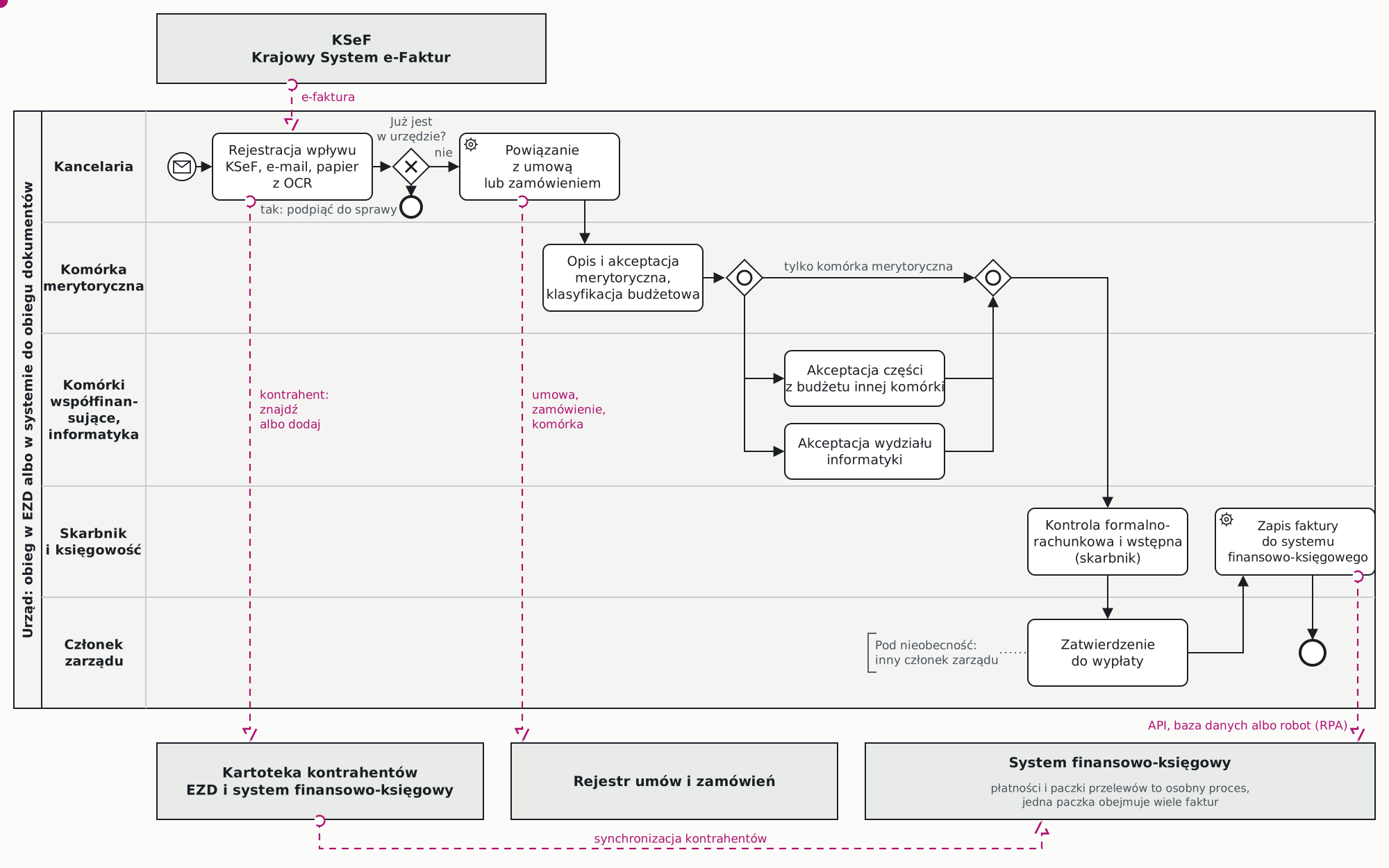
It is worth drawing up such a diagram for your own authority before choosing a tool. It immediately shows how many approvals there are, where an invoice can sit waiting, and at how many points data passes between systems.
The Accounting Act requires that an accounting document be reliable and include a statement that it has been checked and qualified for entry in the books, signed by the person responsible (Article 21(1a) and Article 22). The Public Finance Act entrusts the chief accountant with the preliminary control of the completeness and reliability of documents, confirmed by their signature (Article 54). Who describes and approves an invoice, and in what order, is set out in the authority's internal document-circulation instructions. If approvals are to be electronic, the instructions should provide for this, and the system should keep a record: who approved what and when.
How many systems a single invoice touches
Mapping out an invoice's journey shows that it passes through KSeF, the EZD-class system, the counterparty register, the contract register and the order register (where these exist), the financial plan and budget system, the finance and accounting system, online banking, and sometimes a separate system for projects or public procurement as well. On top of that, there are spreadsheets in which individual units keep their own records of contracts and commitments.
Every transition between systems that no one has connected becomes a manual task: retyping a number, copying an amount, printing, scanning, a phone call to ask a question. None of these tasks require a decision, but they take up the time of several people in several units. No one sees the whole of it, because each person only handles their own fragment.
Where the time really goes
Substantive approval and the treasurer's control are decisions, and they should stay with people. Time is lost elsewhere, on supporting tasks:
- checking whether the invoice has not already arrived through another channel,
- retyping paper invoices and e-mailed invoices, and other cost documents that did not arrive via KSeF,
- searching for the contract or order, and for the unit that placed it,
- adding budget classification that could be read straight from the contract,
- collecting approvals from several units, carrying folders around, and working out who currently has the invoice,
- setting up the same counterparty in two systems,
- retyping invoice data into the finance and accounting system.
These are precisely the tasks worth automating. Not because they are difficult, but because they recur with every single invoice, and an authority handles thousands of them a year.
How to approach invoice workflow sensibly
Order matters here. Process first, tool second.
The goal is not to implement an electronic invoice workflow. The goal is to change how cost documents are handled in a world where systems can carry out repetitive supporting tasks. That changes how many people work, and changing how people work starts with imagining what things could look like instead. That is what digital transformation is about, and it is worth holding onto that principle with every investment in IT systems. Buying a system is not, by itself, a change.
Map the workflow from receipt to payment. With the treasurer, accounting, the secretary and several responsible units involved. Who does what, in which system, how long it takes, where the invoice sits waiting. Such a map often reveals steps left over from the paper era that no one can explain any more. I write about how to prepare such a map before choosing a system on the needs analysis page.
Decide where approval happens. It does not have to be EZD. Approvals can run in the EZD-class system, in a separate workflow tool, or in a module of the finance and accounting system. What matters is that they happen in one place, with a full audit trail, and that the outcome moves onward without retyping. A well-designed workflow determines the approval path itself, based on the budgets funding the expense and its type, runs approvals in parallel wherever order does not matter, and has cover arranged for leave. I describe the difference between a process system and an accounting system in the post on BPM and domain-specific systems.
Connect the workflow to the finance and accounting system. This is the most important integration: the data of an approved invoice, with its description, classification and approvals, should reach accounting as a ready-made record, not a printout. There are three ways to do this. The best is an application programming interface (API) provided by the system vendor. The second is writing directly into the accounting system's database, which requires the vendor's consent and involvement, because an error made this way is hard to detect afterwards. The third, when the system has no interface at all, is a robot (RPA): a simple program that enters the invoice on the user's behalf through the screen, the way a person would. A robot can be fast and cheap to set up, but it is fragile, because a change to the screen after an update can stop it dead. It is best treated as a bridge, until the vendor provides a proper interface. Payments and batches of transfers can stay exactly where they are today, in the finance and accounting system.
Reconcile the counterparty register. An invoice in accounting has to be matched to the right counterparty, so the workflow and the finance and accounting system must refer to the same entities. In an EZD-class system there are usually far more counterparties: residents, applicants and institutions that write to the authority but will never issue it an invoice. In the finance and accounting system there are only entities the authority actually settles accounts with. That is why clear rules are needed from the outset for the life cycle of counterparty data across the authority's systems: who creates a counterparty and when, and in which system; who updates their data and when; and how a change in one system should propagate to the others. On top of that, there needs to be a way of recognising the same supplier, for instance by tax identification number (NIP), so that a new supplier appearing on an invoice reaches accounting without being set up a second time by hand.
Link the invoice to the contract and order register. Such a link points to the responsible unit, the budget classification, and how much of the contract value is still left to be settled.
Update the workflow instructions. An electronic approval that the instructions do not provide for ends up with the invoice still being printed out "for the record" anyway. When changing processes and instructions, it is worth first imagining the ideal state: the way people would work if no one had to carry out unnecessary supporting tasks any more. Only then should the instructions be adjusted to fit that state, not the other way round.
Sources
- Ministry of Finance: scope of mandatory KSeF
- Act of 29 September 1994 on Accounting, ISAP (Articles 21, 22)
- Act of 27 August 2009 on Public Finance, consolidated text, Chancellery of the Sejm (Article 54)
- Krogis compliance calendar: KSeF, e-Delivery (e-Doręczenia), EZD
Legal status as at 30 October 2026.